Spotlight Your Small Business With Affordable Text-to-Video Ads
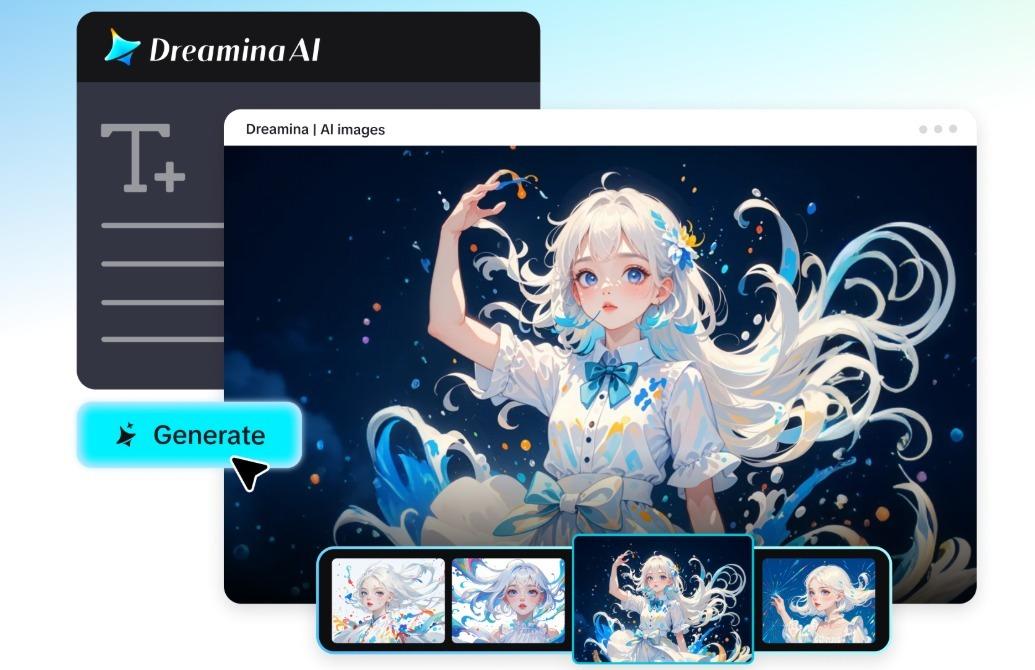
Small businesses typically have a need for fresh advertising but with limited budgets, equipment, and production time. Dreamina AI empowers businesses to brainstorm promotional ideas and create video content without setting up a full shoot for each concept. It offers AI-powered video features, enabling users to create scenes from text prompts, add movement, lighting, and visual styles. These attributes allow entrepreneurs to try out various creative routes without making the commitment to larger campaigns. However, there are factors that affect affordability, such as the amount of available credits, the amount of editing required, the usage rights, as well as other production costs.
What a Small Business Video Ad Needs to Accomplish
A good ad grabs attention, has an offer, is relevant, and includes a call to action. The free text to video generator enables companies to delve into visual concepts that assist these goals. A product launch could include a dramatic reveal, or a café could focus on its cosy ambience. Service industries may depict a process using literal, familiar scenes. While great images can enhance interest, they don’t replace correct claims, familiar branding, or a strong call to action. All creative decisions should be matched to the key advert purpose.
Five Ad Concepts That Can Start With a Text Prompt
Dreamina AI enables small businesses to brainstorm different ad ideas using detailed prompts and visual references. Here are some practical considerations for planning a campaign:
- Product spotlight: Present your product in a well-composed scene with controlled lighting and meaningful camera movements. Include reference images when it is necessary to have packaging, dimensions, or branding in the picture.
- Everyday use moment: Display the product or service in an appropriate context where it is actually used. Modify demonstrations to be realistic and in keeping with the actual capabilities of the product.
- Seasonal promotion: Design graphics related to holidays, celebrations, or seasons. Include the verified discounts, expiration dates, and promotional requirements at the end of the editing process.
- Behind-the-scenes atmosphere: Create illustrative settings to show craftsmanship, preparation, or activity at a workplace. When there is a risk of misinterpreting staged versus documentary images, ensure they are clearly differentiated.
- Brand mood film: Investigate color, texture, lighting, and movement that support your brand personality. Respect and adhere to established visual standards.
- Offer announcement: Create a clear space for announcement and promotional information and a call to action. Check prices, eligibility, and offer terms prior to publication.
Start With the Audience, Offer, and One Clear Message
Before opening Dreamina AI, be sure to know who the audience is, what the product or service is, what the main benefit is, and what’s next. A neighborhood bakery could highlight freshly baked goods, and a cleaning service could focus on flexible appointment times. Different visuals and messaging are needed for these different objectives. Focus on scene, atmosphere, movement, and composition. Check advertising claims that seem to be factual, not relying on imagery generated to convey accurate information. One ad should carry one message, rather than trying to add all the businesses on the same ad at once.
Steps to Spotlight Your Small Business With Affordable Text to Video Ads
Step 1: Set up your account and brief the ad
- Sign up or log in to Dreamina, and your small business gets an ad studio.
- Next, open the “Create” tab on the left menu, then select the “AI video” option.
- Describe your ad’s look and feel in detail, including elements, sound, background, theme, and concept.
Step 2: Choose a model and produce the promo
- Check the bottom of the dialogue box and choose a model that suits your budget.
- Your choices include Dreamina Seedance 2.5, Dreamina Seedance 2.0, Dreamina Seedance 2.0 Fast, Dreamina Seedance 2.0 Mini, Dreamina Seedance 1.0, etc.
- Click “Omni reference” and add multiple product images to guide the AI toward accurate video results.
- Then pick a custom aspect ratio and resolution from the “Aspect ratio” and “Resolution” tabs.
- Finally, press the “Generate” tab and let Dreamina start building your promotional video right away.
Step 3: Refine the ad and download it
- If the ad feels off, use “Edit prompt” or “Regenerate” to improve the final result.
- Tweak the finished clip with the “Edit video” option to better match your brand style.
- Use “Edit segment” to adjust only part of the video, like a single offer scene.
- Add length with “Extend video”, or boost the visuals through “Creative upscale” for crisper quality.
- Dreamina gives you complete freedom to edit your ad exactly the way you like it.
- Click “Download” at the interface’s top right to save the ad on your local device.
Keep Product and Brand Details Trustworthy
Logos, packaging, fine print, proportions, etc. can be changed with text-based generation, even if the prompt is specifically described. Dreamina AI reference images can be used to direct the scene created, but there is no guarantee of product fidelity. Review all major details prior to going live, especially if the visual aspect of your product is a deciding factor. If not depicting real customers, real business premises, or documented product performance, treat the generated lifestyle scenes as illustrations. Do not use fake reviews or bogus results demonstrations or make false promises. Before sharing promotion, review any relevant advertising regulations, image permissions, music licenses, and platform policies.
Stretch a Modest Budget Through Reusable Creative Planning
One campaign idea can have multiple visuals, like a product reveal, seasonal backdrops, and mini promotional videos. When experimenting with varying elements like lighting, opening composition, setting, or camera movement, Dreamina AI simplifies the process. This helps to determine productive avenues of creativity without having to start over again with the idea. Before choosing a model, duration, or resolution, check the available daily credits and the generation cost that is displayed. While free credits can help with the early stages of experimenting, availability and allowances can differ. There can be additional costs involved with editing, voiceovers, licensed music, and assembly. Some production tasks can be reduced by using AI, but there is still a need for careful review.
Conclusion
Overall, Dreamina AI offers a practical solution for small businesses to experiment with video ads without entering into the high cost of production upfront. Clear objectives, accurate product reference, recognisable branding, and truthful claims are still key. Select appropriate formats, check generation costs, and check all the details before publishing. Have an offer that actually sounds believable, create a visual concept, and stick to one goal for a campaign. If a message is accompanied by strong visuals, it must also be one that the viewer can comprehend and believe.
Tara Lets Anywhere features voices from all over the world — travelers, writers, expats, and local experts who write, often from their own firsthand experience. We believe great stories have no borders, and our global contributors bring those stories straight to you.

You May Also Like
Savoy Hotel Manila Celebrates 7 Years of Heartfelt Filipino Hospitality

7-Eleven Brings the Holiday Charm with the City Cafe Christmas Blind Cups